Key takeaways
- One light, garage or basement, no Wi-Fi: a mechanical timer (BN-LINK 24-hour mechanical, Woods, or a GE-style dial timer).
- Bedroom or apartment, noise-sensitive: a digital timer or smart plug, since mechanical timers tick audibly.
- Light plus fan or pump on different schedules: BN-LINK Dual Outlet Digital.
- Remote check-in, travel, or power monitoring: Kasa KP115 (or the smaller HS103 for basic scheduling).
- Short bursts or seedling trays that need precise on-times: any digital timer with minute-level programming.
The best grow light timer for most indoor gardens is a minute-accurate digital timer such as the BN-LINK 7-Day Programmable Digital or the Century 7-Day Heavy Duty Digital, the Kasa Smart Plug KP115 if you want app control and energy monitoring, and a simple mechanical timer like the Woods plug-in model when you want something with no setup that survives a Wi-Fi outage. Grow light timers do one job, switching power on and off on a fixed schedule, so the right choice comes down to schedule precision, load rating, what happens during a power cut, and how many lights or fans you need to run.
Plants respond to day length and to a dark period, so a drifting or forgotten schedule shows up as stretched growth, stalled flowering, or stressed seedlings. This guide explains the three timer types, gives a worked load-and-schedule calculation, compares eight real models by the specs that matter, and finishes with setup and safety steps and an FAQ.
Our top picks


As an Amazon Associate we earn from qualifying purchases at no extra cost to you.
Quick answer: which timer type fits which setup
- One light, garage or basement, no Wi-Fi: a mechanical timer (BN-LINK 24-hour mechanical, Woods, or a GE-style dial timer).
- Bedroom or apartment, noise-sensitive: a digital timer or smart plug, since mechanical timers tick audibly.
- Light plus fan or pump on different schedules: BN-LINK Dual Outlet Digital.
- Remote check-in, travel, or power monitoring: Kasa KP115 (or the smaller HS103 for basic scheduling).
- Short bursts or seedling trays that need precise on-times: any digital timer with minute-level programming.
How we chose
This is a research-based selection drawn from published buyer’s guides and manufacturer listings, not a bench comparison. We screened timers on the criteria that affect a grow light, listed here in priority order.
- Load rating. The timer’s rated watts or amps must exceed the total draw of everything plugged into it, with margin. Common plug-in timers are rated 15A and 1875W.
- Grounded 3-prong plug. Grow lights and power strips are normally grounded; the timer should be too.
- Scheduling resolution. Mechanical dials usually work in 15 to 30 minute steps. Digital models work to the minute.
- Power-outage behavior. Battery backup or locally stored schedules keep timing correct after a brief outage.
- Number of outlets. One outlet for a single light, two for light and fan.
- Noise. Mechanical timers tick, which matters in bedrooms.
Where a spec for a model was not stated in the sources we reviewed, we describe the class of product instead of giving a number, and you should confirm it on the product page.
The three timer types
Mechanical dial timers
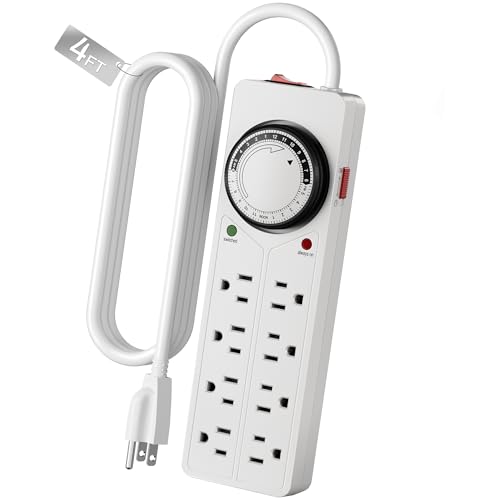
A rotating 24-hour dial with pins or tabs you push in or out. They need no setup beyond turning the dial to the current time, work without Wi-Fi, and are very hard to break. The tradeoffs are coarse resolution (typically 15 minutes or more), audible ticking, and no way to program different schedules for different days. If the power cuts out, the dial keeps turning when power returns but runs behind by the length of the outage.
Digital programmable timers
An LCD-based plug-in timer with minute-level programming and multiple on/off events per day. Many include a small backup battery or capacitor so the clock survives short outages. They are quiet and precise, and dual-outlet versions can run a light and a fan separately.
Smart plugs
Wi-Fi plugs controlled by an app. They add remote control, voice assistant compatibility, and sometimes energy monitoring. They are silent. The downside is dependence on a home network: schedules stored on the device keep running without Wi-Fi on models that store them locally, but not all do, so check before buying.
Worked example: load, schedule, and energy
Follow this logic for any setup. The numbers below are an illustration.
- Add up the load. Suppose you run two 40W LED panels and one 15W clip fan on one timer. Total: 40 + 40 + 15 = 95W. A timer rated at 1875W has about 20 times the headroom needed, so rating is not a concern. Rating becomes important with high-wattage fixtures or when you also plug in heaters or pumps.
- Convert watts to amps to sanity-check a smart plug. At 120V, 95W is about 0.8A. Even a plug with a more modest amp rating handles this easily. When a listing does not state its rating, find it on the product page.
- Pick the photoperiod. Many leafy greens and foliage plants do well with roughly 12 to 16 hours of light. A 14-hour day is a common choice for herbs and lettuce.
- Program the schedule. On a 24-hour dial with 15-minute segments, one day has 96 segments. A 14-hour light period is 14 x 4 = 56 segments pushed in, leaving 40 segments (10 hours) for dark. On a digital timer, enter on at 6:00 and off at 20:00.
- Estimate energy use. Kilowatt-hours equal watts times hours divided by 1,000. For 95W for 14 hours a day over 30 days: 95 x 14 x 30 / 1,000 = about 39.9 kWh a month. Multiply by your local rate per kWh to see monthly cost. A smart plug with energy monitoring will show the real figure.
- Check inrush on cheap drivers. Some LED drivers briefly draw more current when switching on. If a light flickers or a timer clicks repeatedly, move to a timer rated for heavier loads, such as a heavy-duty model listed as motor-load rated.
Comparison table
| Model | Type | Load rating | Outlets | Scheduling | Outage handling |
|---|---|---|---|---|---|
| BN-LINK 24-Hour Mechanical | Mechanical | 1875W / 15A (heavy-duty version) | 1 | Dial, coarse steps | Dial runs behind after outage |
| Woods Mechanical Plug-In | Mechanical | 1875W | 1 | 15-minute minimum interval | No battery |
| GE-style mechanical dial | Mechanical | Check listing | 1 | Dial | Dial runs behind after outage |
| BN-LINK 7-Day Programmable Digital | Digital | 1875W / 15A | 1 | Minute-accurate, 8 daily events | Battery backup |
| Century 7-Day Heavy Duty Digital | Digital | 1875W / 15A, motor-load rated | 1 | Minute-accurate, 8 daily events | Battery backup |
| BN-LINK Dual Outlet Digital | Digital | 1875W / 15A combined | 2 | Minute-accurate, 8 daily events per outlet | Battery backup |
| Kasa Smart Plug KP115 | Wi-Fi smart plug | Check listing | 1 | Minute-accurate, app | Schedules stored on device |
| Kasa Smart Plug HS103 | Wi-Fi smart plug | Check listing | 1 | Minute-accurate, app | Check listing |
Best simple and low-tech
BN-LINK 24-Hour Mechanical Timer
Specs: mechanical dial · 24-hour cycle · heavy-duty version rated 1875W / 15A · grounded 3-prong plug
Best for: A single light in a garage, shed, or basement where Wi-Fi is weak and nobody sleeps nearby.
Skip if: You need precise timing or quiet operation. Dial steps are coarse and the motor ticks.
Pros:
- No setup beyond setting the dial.
- Unaffected by internet outages.
- Easy to inspect: you can see the schedule on the dial.
Cons:
- Runs behind after a power outage until you reset it.
- Same schedule every day.
Woods Mechanical Plug-In Timer
Specs: mechanical dial · 1875W · 15-minute minimum interval · single outlet
Best for: Growers who want a widely available, standard timer for one fixture.
Skip if: You need on-times shorter than 15 minutes, for example seedling misting bursts.
Pros:
- Standard rating that covers most grow lights.
- No battery to replace.
Cons:
- No backup during outages.
- Audible ticking in quiet rooms.
GE-style mechanical dial timer
Specs: mechanical dial · 24-hour cycle · confirm load rating on the product page
Best for: Budget-minded growers with a low-wattage light who want a familiar hardware-store design.
Skip if: You plan to add more lights later. Some basic dial timers carry lower load ratings than the heavy-duty versions above.
Pros:
- Entry-level cost tier and simple operation.
Cons:
- Load rating varies by version, so verify before use with larger fixtures.
Best digital programmable
BN-LINK 7-Day Programmable Digital Timer
Specs: digital · 7-day programming · 8 daily events · minute-accurate · 1875W / 15A · battery backup
Best for: Most home growers who want a quiet, accurate, reasonably priced timer with an outage safeguard.
Skip if: You want remote control or energy readouts.
Pros:
- Minute-level schedule, so you can fine-tune day length.
- Battery backup keeps the clock after short outages.
- Different schedules on different days if you need them.
Cons:
- Button-based programming takes a few minutes to learn.
- The backup battery eventually needs replacement.
Century 7-Day Heavy Duty Digital Timer
Specs: digital · 7-day · 8 daily events · 1875W / 15A · motor-load rated · battery backup
Best for: Setups with a pump, fan, or a heavier fixture that may draw a surge on startup.
Skip if: A basic digital timer already covers your load; the heavy-duty design is more than a single LED panel needs.
Pros:
- Motor-load rating suits inductive loads.
- Same precise programming as other digital timers.
Cons:
- Likely bulkier than a basic plug-in timer, so check clearance on a crowded power strip.
BN-LINK Dual Outlet Digital Timer
Specs: digital · two outlets with separate programs · 8 daily events per outlet · 1875W / 15A combined · battery backup
Best for: Running a grow light and a circulation fan, or a light and a heat mat, on different schedules from one wall outlet.
Skip if: You use one light only. A single-outlet timer is simpler.
Pros:
- Two independent schedules in one device.
- Saves outlet space.
Cons:
- The 1875W rating is shared across both outlets.
- Two programs mean more menu steps.
Best smart plugs
Kasa Smart Plug KP115
Specs: Wi-Fi · app control · energy monitoring · Alexa and Google Home support · schedules stored on the device · single outlet
Best for: Apartment growers, frequent travelers, and anyone who wants to see actual power draw.
Skip if: Your grow space has no reliable Wi-Fi signal, or you run a heavy load. Confirm the plug’s amp rating first.
Pros:
- Remote on/off from anywhere.
- Energy monitoring turns the monthly-cost estimate into a real number.
- Silent operation.
Cons:
- Depends on app and account setup.
- Rated for a single plug-in load, not a whole power strip of heavy fixtures.
Kasa Smart Plug HS103
Specs: Wi-Fi · app scheduling · compact single outlet · no energy monitoring in this class
Best for: A basic low-cost smart schedule for one light, without paying for energy monitoring.
Skip if: You want to track kilowatt-hours, in which case choose the KP115.
Pros:
- Small footprint that leaves the neighboring outlet free.
- Same app ecosystem as the KP115.
Cons:
- Verify load rating and outage behavior on the product page.
Decision matrix
| Your situation | Priority | Timer type | Example |
|---|---|---|---|
| Single LED panel, garage, no Wi-Fi | Reliability | Mechanical | BN-LINK 24-Hour, Woods |
| Bedroom shelf, quiet needed | Silence and precision | Digital or smart plug | BN-LINK 7-Day, Kasa KP115 |
| Light plus fan or pump | Two schedules | Dual-outlet digital | BN-LINK Dual Outlet |
| Heavier or motor load | Rating margin | Heavy-duty digital | Century 7-Day Heavy Duty |
| Frequent travel | Remote access | Smart plug | Kasa KP115, HS103 |
| Seedlings needing exact times | Minute resolution | Digital | BN-LINK 7-Day |
Photoperiod guidelines
Treat these as starting points and adjust to the plant.
- Seedlings and microgreens: roughly 14 to 16 hours of light.
- Leafy greens and herbs: roughly 12 to 16 hours.
- Foliage houseplants: roughly 10 to 14 hours.
- Short-day flowering plants: need a long uninterrupted dark period to bloom, so a timer is essential and any light leak during the dark period can disrupt flowering.
Consistency matters more than the exact number. A timer that drifts by an hour or two a week gives plants a shifting day length. That is the case for a digital or smart timer with a clock that does not run behind after an outage.
Setup and safety checklist
- Add the wattage of everything on the timer and confirm it is below the timer’s rating, with comfortable margin.
- Plug the timer directly into a wall outlet, not into a daisy chain of power strips, and keep the cord away from water and watering cans.
- Use a grounded 3-prong timer with a grounded light. Do not use adapters that bypass the ground.
- Set the current time first, then program on and off events, and confirm the light turns on at the right moment by changing the clock temporarily if the model allows it.
- Label the timer with the schedule so anyone in the house knows not to unplug it.
- Replace the backup battery on digital models once a year, and re-check the clock after any power outage on a mechanical model.
- If a timer or plug feels warm, smells hot, or buzzes, stop using it and replace it with a higher-rated model.
Common mistakes
- Plugging a heater, humidifier, and lights into one timer and exceeding its rating.
- Choosing a smart plug with a low amp rating for several fixtures on a power strip.
- Forgetting that mechanical timers drift after a power outage.
- Setting the schedule in the wrong time of day (AM versus PM on the dial) so the light runs through the night.
- Leaving a lamp on a timer where room light or street light leaks in during the dark period for a short-day plant.
FAQ
What is the best timer for grow lights?
A minute-accurate digital timer with battery backup suits most growers. Pick a mechanical timer for no-setup reliability or a smart plug for remote control and energy monitoring.
Whichever you choose, confirm its load rating exceeds the total wattage of everything plugged in.
Mechanical or digital timer for grow lights?
Digital timers are more precise and quiet. Mechanical timers are simpler and immune to Wi-Fi problems but work in coarse 15 to 30 minute steps and tick audibly.
For a single light in a garage, mechanical is fine. For bedrooms and fine control, go digital.
How many hours should a grow light be on?
Most leafy greens and houseplants do well with 10 to 16 hours a day. Seedlings often get longer, while short-day flowering plants need a long uninterrupted dark period.
Start with 14 hours for herbs and lettuce and adjust based on how the plants respond.
Can a smart plug run a grow light?
Yes, if the plug’s load rating exceeds the light’s draw. Many LED grow lights draw well under 100W, which is within the range of common smart plugs.
Check the plug’s stated amp or watt rating, and avoid putting a full power strip of heavy fixtures on one plug.
What happens to a timer during a power outage?
Mechanical dial timers resume but run behind by the outage length. Digital timers with battery backup keep time through short outages, and smart plugs with local schedules typically resume correctly.
After any outage, glance at the light and the clock to confirm the schedule is still correct.
Do I need a timer rated for motor loads?
Only if you plug in motors such as pumps or large fans, which draw a surge at startup. A heavy-duty or motor-load rated timer handles that surge better than a basic model.
A single LED panel rarely needs it, but a pump and light on one timer is a good case for the heavy-duty option.
Can I run a light and a fan on one timer?
Yes, if the combined wattage is within the rating. A dual-outlet timer lets the two run on different schedules, such as light for 14 hours and fan for 24.
The BN-LINK Dual Outlet Digital is built for this, with a combined 1875W rating.
How do I make a mechanical timer match my schedule?
Turn the dial until the arrow points to the current time, then push in or out the tabs for the hours you want the light on. Each tab usually equals 15 minutes.
For a 14-hour day, that is 56 tabs set to on. Verify by watching the first on and off cycle.