Key takeaways
- Best Carry-On Luggage With Laptop Compartments: 2026 Picks by Travel Situation The best carry on luggage with laptop compartments for most travelers is the Travelpro Platinum Elite Carry-On Spinner: its 21 x 14 x 9-inch case matches the commonly published…
Best Carry-On Luggage With Laptop Compartments: 2026 Picks by Travel Situation
The best carry on luggage with laptop compartments for most travelers is the Travelpro Platinum Elite Carry-On Spinner: its 21 x 14 x 9-inch case matches the commonly published maximum for a full-size U.S. carry-on, while its padded front compartment accommodates laptops up to 15.6 inches. Choose the Monos Carry-On Pro for a cleaner hard-shell design, the July Carry On Pro for a 16-inch laptop, or the Briggs & Riley Baseline Essential 22-inch Carry-On when repairability and compression matter more than low weight.
Airline rules are not universal. The dimensions below include wheels and handles where the manufacturer publishes them, but a carrier can impose a smaller limit. A bag that is 22 x 14 x 9 inches is more broadly useful than one that is 23 x 15 x 9 inches, especially on regional aircraft.
Our top picks
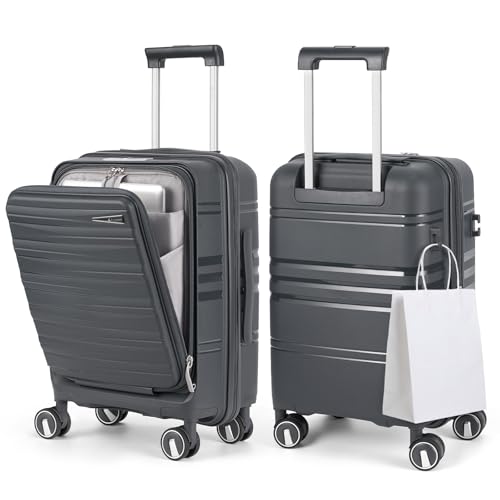
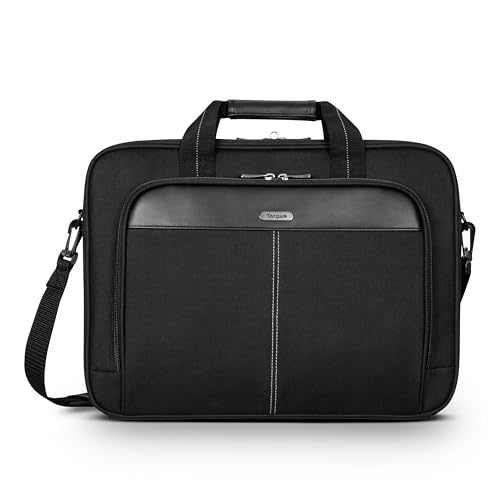

As an Amazon Associate we earn from qualifying purchases at no extra cost to you. Ratings are shown as listed on Amazon.
Quick comparison: laptop sleeve size and airline fit
| Carry-on | Exterior dimensions | Weight | Laptop sleeve capacity | Best for |
|---|---|---|---|---|
| Travelpro Platinum Elite Carry-On Spinner | 21 x 14 x 9 in | 7.8 lb | 15.6-inch laptop; approximately 14.5 x 10.0 in usable sleeve opening | Frequent flyers wanting a conventional soft-sided bag |
| Monos Carry-On Pro | 22 x 14 x 9 in | 8.4 lb | 15-inch laptop; approximately 14.0 x 9.8 in usable sleeve opening | Organized packing with a hard shell |
| July Carry On Pro | 21.7 x 14.2 x 9 in | 8.5 lb | 16-inch laptop; approximately 15.7 x 10.2 in usable sleeve opening | Travelers carrying larger laptops |
| Briggs & Riley Baseline Essential 22-inch Carry-On | 22 x 14 x 9 in | 10 lb | 15.6-inch laptop; approximately 14.8 x 10.1 in usable sleeve opening | Business travel and long-term ownership |
The sleeve figures are the practical padded openings to compare against your computer, not the diagonal screen measurement. Laptop manufacturers measure screens diagonally, while a sleeve must accommodate the laptop’s actual width, depth, thickness, and corner shape. A 16-inch laptop may be narrower than an older 15.6-inch workstation, so measure the computer itself.
Best overall: Travelpro Platinum Elite Carry-On Spinner
The Platinum Elite is the safest choice when airline compliance and quick access matter more than a minimalist appearance. Its 21 x 14 x 9-inch exterior fits the frequently used 22 x 14 x 9-inch U.S. carry-on limit without relying on an expansion zipper. The 15.6-inch padded laptop compartment sits in the exterior organizer, so you can remove a computer without opening the main clothing compartment.
How its security pocket works
At the checkpoint, place the laptop in the padded sleeve with the zipper fully closed, then unzip the front organizer and remove the entire sleeve area from the bag. The pocket also provides space for a tablet, charger, passport, and a thin notebook. Do not fill the organizer with dense objects: its front position can make the bag front-heavy and may force the laptop against the metal frame.
The soft-sided construction is forgiving when an overhead bin is tight. Its trade-off is less crush protection than a hard shell, and the exterior fabric can show dirt around the wheel wells and lower corners. Expect a general market price around $250–$350, depending on the collection and sale period.
Best hard-shell option: Monos Carry-On Pro
The Monos Carry-On Pro combines a 22 x 14 x 9-inch case with a front-opening compartment designed for a laptop and work accessories. The listed laptop capacity is up to 15 inches, with an approximately 14 x 9.8-inch padded opening. It is a good match for a 13- or 14-inch ultrabook and many compact 15-inch models, but not the safest choice for a bulky 16-inch workstation.
How its security pocket works
The front compartment opens independently from the clamshell body. You can remove the laptop while the clothing section remains closed, which is useful when the bag is packed tightly. The compartment is not a substitute for a separate protective laptop case: the computer sits close to the outer shell, so avoid placing keys, power bricks, or hard adapters in the same layer.
Its polycarbonate shell resists rain better than fabric, but scratches are normal and the front hinge receives more stress than a traditional top-opening suitcase. The approximate market range is $300–$400.
Best for a 16-inch laptop: July Carry On Pro
The July Carry On Pro is the most suitable pick in this group when your computer needs a larger sleeve. Its 21.7 x 14.2 x 9-inch dimensions are close to common international carry-on limits, and its padded compartment accepts laptops up to 16 inches, with an approximately 15.7 x 10.2-inch opening.
The important caveat is width. Although 14.2 inches is accepted by many airlines, it exceeds a strict 14-inch limit by 0.2 inch before any manufacturing tolerance is considered. If your itinerary includes smaller aircraft or airlines that measure carefully, select a narrower model instead.
How its security pocket works
The front panel is designed for direct access: unzip the compartment, lift out the laptop, and keep the main case closed. Store the charger in a separate elastic or mesh section so the cable does not press into the computer during handling. Because the laptop is at the front, keep heavier items such as shoes toward the center of the suitcase to preserve balance.
Expect to pay roughly $300–$400. The front structure is convenient but adds weight and creates another zipper and hinge area to protect from overpacking.
Best for long-term ownership: Briggs & Riley Baseline Essential 22-inch
The Baseline Essential is heavier at about 10 pounds, but its 22 x 14 x 9-inch dimensions are easy to compare with the standard U.S. carry-on limit. Its padded compartment accommodates a 15.6-inch laptop, with an approximately 14.8 x 10.1-inch sleeve opening. The distinctive compression system allows clothing to be packed down without requiring an expansion section.
This is the choice for frequent business travelers who value a repair-oriented ownership model and structured organization. The disadvantages are weight, a higher general market range of about $500–$700, and a front laptop section that becomes crowded if you also carry a tablet, documents, and a large charger.
How its security pocket works
Use the exterior business compartment before reaching the checkpoint: remove the laptop, tablet, and liquids from their dedicated sections, then place them in the security tray. The main suitcase does not need to be opened unless an officer requests an additional inspection. Keep the compression panel away from the laptop section; packing it too tightly can transfer pressure through the divider.
Which one should you buy?
| Your situation | Best choice | Reason |
|---|---|---|
| Lowest practical risk of exceeding 22 x 14 x 9 inches | Travelpro Platinum Elite | 21 x 14 x 9 inches and a flexible soft-sided body |
| 13- or 14-inch laptop and preference for hard shell | Monos Carry-On Pro | Dedicated front access with a 15-inch sleeve limit |
| 16-inch laptop | July Carry On Pro | Largest stated sleeve in this comparison |
| Frequent business travel and long ownership | Briggs & Riley Baseline Essential | Strong organization, compression, and repair-focused construction |
| Lowest weight is the priority | Travelpro Platinum Elite | About 7.8 pounds before packing |
How to verify laptop and airline fit before buying
- Measure the laptop body. Record width, depth, and thickness with the protective case removed. Compare those numbers with the sleeve opening, not merely the advertised screen size.
- Add clearance. Allow at least 0.25 inch in width and depth for a padded sleeve, and more if the laptop has an unusually thick hinge or a rugged case.
- Measure the packed suitcase. Fill the bag as you normally would and measure from the widest wheel or handle point. Expansion can add roughly 1–2 inches of depth and may make the bag non-compliant.
- Check every airline on the itinerary. The most restrictive carrier, not the first flight, determines the safer purchase. Regional aircraft often have smaller cabin limits.
- Practice the checkpoint routine. Put the laptop, charger, and liquids in exterior-access pockets. If removing the computer requires opening the main compartment, the bag is not truly quick-access in daily use.
Durability and maintenance realities
Wheels, telescoping handles, zippers, and front-compartment stitching usually wear before the main case. Do not drag a loaded suitcase sideways over curbs, and avoid forcing a zipper around an overfilled laptop compartment. Keep the padded sleeve lightly loaded: a laptop plus a charger is reasonable, while a hard power bank, camera lens, and headphones can create pressure points.
Clean fabric with a damp cloth and mild soap; avoid soaking interior padding. Wipe polycarbonate shells with diluted soap rather than abrasive cleaners. Check wheel housings after trips for thread, hair, and grit. Most importantly, never leave the laptop in the exterior compartment while the suitcase is being checked at the gate. A padded sleeve helps with everyday bumps, but it is not designed to protect a computer from baggage-handling drops.
Bottom line
Choose the Travelpro Platinum Elite for the broadest airline compatibility, the Monos Carry-On Pro for a streamlined hard shell and 15-inch computer, the July Carry On Pro for a 16-inch laptop, and the Briggs & Riley Baseline Essential when durability and long-term repairability justify extra weight and cost. Before ordering, compare your laptop’s measured body dimensions with the exact sleeve opening and confirm the smallest airline limit on your route.