Key takeaways
- Typical home, new cable runs possible: An 8-channel PoE NVR kit with four 4K cameras. PoE sends power and video over one Ethernet cable, simplifying installation.
- Large home or small business: A 16-channel NVR, even if you start with six to eight cameras. Spare channels prevent an early recorder replacement as coverage expands.
- Existing coax wiring: Consider a compatible HD-over-coax recorder and cameras. It can reuse suitable cable, but it is not the same as an IP NVR; check the recorder’s supported camera formats before buying.
- Detached buildings or difficult cable routes: Use wired cameras where reliable Ethernet is practical, and assess a point-to-point wireless bridge for the network link where it is not. A bridge still needs power at the remote end; it does not make a standard PoE camera wire-free.
Best NVR Security Camera Systems for Home & Business
The best NVR security camera system is a PoE kit sized for the cameras you need now plus a few you may add later, with enough hard-drive capacity for your retention target and cameras whose night-vision range suits your property. For most homes, an 8-channel system with four 4K cameras is a practical starting point; larger homes and small businesses should consider 16 channels, while long or poorly lit outdoor areas may need supplemental lighting rather than simply higher camera resolution.
Quick picks by property and wiring
- Typical home, new cable runs possible: An 8-channel PoE NVR kit with four 4K cameras. PoE sends power and video over one Ethernet cable, simplifying installation.
- Large home or small business: A 16-channel NVR, even if you start with six to eight cameras. Spare channels prevent an early recorder replacement as coverage expands.
- Existing coax wiring: Consider a compatible HD-over-coax recorder and cameras. It can reuse suitable cable, but it is not the same as an IP NVR; check the recorder’s supported camera formats before buying.
- Detached buildings or difficult cable routes: Use wired cameras where reliable Ethernet is practical, and assess a point-to-point wireless bridge for the network link where it is not. A bridge still needs power at the remote end; it does not make a standard PoE camera wire-free.
Systems worth comparing
These established brands offer wired recorder-based systems or components for building one. Exact channel limits, included cameras, storage and compatibility vary by model, so verify the model’s current specifications before purchase.
Our top picks
 REOLINK 5MP 8CH Home Security Camera System
- Discover potential crime has never been so easier…
- Smart PoE IP cameras can identify people, animals,…
- With everything needed, the poe security camera system…
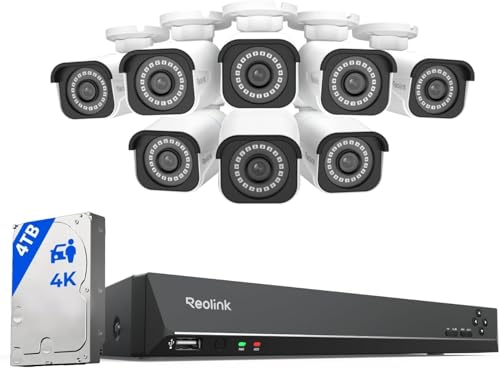 REOLINK 16CH 4K Security Bullet Camera System
- 4K Ultra HD
- Person/Vehicle/Animal Detection
- Remote Access and Playback
 【Human Track】Hiseeu 4K PoE PTZ Security Camera
- 【300 Degree Pan /90 Degree Tilt & Auto…
- 【3TB HDD+ 7/24/365 Record+ Smart Playback】We have Various…
- 【4K 8MP 8 Ports PoE NVR16CH Expandable】This NVR…
| Product | Key specs | |
|---|---|---|
| REOLINK 5MP 8CH Home Security Camera System | Discover potential crime has never been so easier… Smart PoE IP cameras can identify people, animals,… With everything needed, the poe security camera system… | Check price |
| REOLINK 16CH 4K Security Bullet Camera System | 4K Ultra HD Person/Vehicle/Animal Detection Remote Access and Playback | Check price |
| 【Human Track】Hiseeu 4K PoE PTZ Security Camera | 【300 Degree Pan /90 Degree Tilt & Auto… 【3TB HDD+ 7/24/365 Record+ Smart Playback】We have Various… 【4K 8MP 8 Ports PoE NVR16CH Expandable】This NVR… | Check price |
 REOLINK 16CH 4K Security Dome Camera System REOLINK 16CH 4K Security Dome Camera System | Stunning True 4K Ultra HD Clarity - Capture… Person/Vehicle Detection Plug and Play PoE System | Check price |
As an Amazon Associate we earn from qualifying purchases at no extra cost to you.
| Brand or system type | Useful fit | What to verify | Typical trade-off |
|---|---|---|---|
| Reolink PoE NVR kits | Homeowners seeking a bundled recorder and cameras | Channels, included camera resolution, drive capacity and supported expansion | Convenient bundles; confirm camera-to-recorder compatibility before mixing models |
| ANNKE wired NVR kits | Budget-conscious home or small-site installations | Whether the kit is IP/PoE or coax-based, plus storage and remote-viewing requirements | Kit specifications differ; compare the exact recorder, not just the camera count |
| Ubiquiti UniFi Protect | Owners already using, or willing to adopt, UniFi networking | Recorder model, camera compatibility and whether storage is included or separately fitted | An integrated ecosystem, but less suited to buyers wanting a simple all-in-one kit from any brand |
| Hikvision or Dahua IP systems | Installers and businesses needing configurable, scalable systems | Local availability, model compatibility, security updates and applicable procurement rules | Broad product ranges can require more careful setup and ongoing administration |
Choose channel capacity and storage before resolution
Channel count is the maximum number of cameras the recorder can support—not the number included in a bundle. A four-camera kit on an 8-channel NVR leaves four channels available, but the recorder may also have limits on incoming bandwidth, supported resolution or decoding. Check those limits if you plan to add high-resolution cameras or view many feeds at once.
Storage determines how far back you can review footage. The estimate below is a planning example, not a guarantee: actual bitrate changes with motion, detail, frame rate, compression and camera settings. It assumes continuous recording and decimal gigabytes.
| Setup | Illustrative bitrate per camera | Approx. footage per day | Approx. 30-day storage |
|---|---|---|---|
| 4 cameras, 4 Mbps each | 4 Mbps | 173 GB total | 5.2 TB |
| 8 cameras, 4 Mbps each | 4 Mbps | 346 GB total | 10.4 TB |
| 4 cameras, 8 Mbps each | 8 Mbps | 346 GB total | 10.4 TB |
Calculation: bitrate in megabits per second × 10.8 gives approximate gigabytes per day per camera. Multiply by camera count and days retained. For example, four cameras at 4 Mbps need about 4 × 4 × 10.8 × 30 = 5,184 GB, or 5.2 TB, before allowing for formatting and operating overhead. Motion-only recording may reduce use, but busy entrances can record frequently; test retention after installation rather than assuming it will halve storage.
Look for a recorder that supports a surveillance-rated hard drive and check the maximum drive capacity and number of bays. A larger disk is not automatically compatible with every NVR. Also decide whether you need a second disk, exportable clips or off-site backup: local recording can keep working through an internet outage, but it does not protect footage if the recorder is stolen or damaged.
What “4K night vision” does—and doesn’t—mean
4K describes image resolution, not how well a camera sees in darkness. Infrared illumination can produce a monochrome night image, while visible white lights can provide color at night but may attract attention or disturb neighbors. Compare the camera’s stated night-vision distance with the distance to the subject you actually need to identify, and check sample footage at that distance if available.
At night, a person crossing close to a camera can still blur if shutter settings, lighting or movement are unfavorable. A camera mounted too high may capture a clear view of a hat rather than a useful face. Position entry cameras near face height where practical, angle them to avoid backlighting, and use a separate camera for broad scene coverage. Clean the lens and infrared cover periodically; dirt, spiderwebs and water spots can reflect infrared light and create a washed-out image.
Wiring, installation and ownership trade-offs
PoE is usually the simplest wired choice when you can run outdoor-rated Ethernet from the recorder or a PoE switch to each camera. Measure cable routes, not straight-line distances, and plan for corners, eaves, conduit and service loops. Follow local electrical and building rules, use weather-rated connections outdoors, and avoid running network cable where it could be damaged or create a trip hazard.
Some NVRs have PoE ports built in; others need a separate PoE switch. Cameras connected directly to an NVR’s private PoE network may not be interchangeable with cameras connected to a home router without reconfiguration. Before buying mixed-brand equipment, confirm ONVIF support and the specific features that remain available—basic video may work while motion alerts, audio or smart detection do not.
Expect the hard drive to be the main wear item in a recorder that runs continuously. Keep the NVR ventilated, install it somewhere secure and reasonably cool, and check drive-health alerts and recording playback periodically. Use a strong unique password, update firmware, and limit remote access to the people who need it. Local recording reduces dependence on a subscription, but app access, alerts and cloud backup policies vary by brand.
Match the system to your situation
| Your situation | Practical starting point | Why |
|---|---|---|
| Small home, 3–4 views, basic installation experience | 8-channel PoE NVR, four cameras, storage sized to retention goal | Leaves room to expand without paying for a large recorder upfront |
| Large home, garage or outbuildings | 16-channel recorder; plan cable routes and remote network links | Extra channels help accommodate entrances and separate structures |
| Small business needing several weeks of continuous footage | 16-channel system with calculated multi-terabyte storage and drive-health monitoring | More cameras and continuous recording raise storage needs quickly |
| Rental or finished property where new cable runs are impractical | Assess existing coax compatibility or a professionally planned network bridge | A standard PoE kit still needs a physical cable to each camera |
Bottom line
For most properties, an 8-channel PoE NVR with four 4K cameras balances expansion room and manageable installation. Move to 16 channels for a larger site, and choose storage from a retention calculation rather than the kit’s camera count. Prioritize suitable lighting, camera placement, verified compatibility and secure installation: those details often matter more to usable evidence than the 4K label alone.