Key takeaways
- Check the mode: select TX (transmit) to send sound to headphones, or RX (receive) to send phone audio to wired speakers.
- Use the right output: set the TV or computer to the adapter’s connected audio output, such as optical, AUX, or USB audio.
- Pair one device first: put the adapter and headphones into pairing mode close together, then confirm audio before adding a second device.
- Verify the codec: consult both devices’ specifications or companion software; a codec printed on the adapter’s packaging does not guarantee it is active.
- Troubleshoot silence: check TV digital-audio settings, cable seating, adapter mode, and volume on both devices. Optical connections may require PCM output rather than a surround format.
Best Bluetooth Adapters Under $50: Top Picks
The best Bluetooth adapter under $50 depends on what you’re connecting: choose a Bluetooth 5.3 USB transmitter for a TV or computer with a USB audio output, a compact USB receiver for wired headphones or speakers, or a 3.5 mm Bluetooth receiver for an older stereo. For most buyers, matching the adapter’s connection type and codec support to both devices matters more than the Bluetooth version printed on the box.
Bluetooth adapters can transmit audio from a source to headphones or receive audio from a phone and send it to wired speakers. Some devices do both, but not every adapter supports both modes. Check the product’s operating modes and audio connections before buying; “Bluetooth adapter” alone doesn’t tell you what it can do.
Our top picks



As an Amazon Associate we earn from qualifying purchases at no extra cost to you. Ratings are shown as listed on Amazon.
Top picks by setup
Best for a TV: 1Mii B06TX
The 1Mii B06TX is a dedicated Bluetooth transmitter for sending TV or other wired audio to Bluetooth headphones. It’s a better fit than a tiny USB dongle if your TV has optical, coaxial, or 3.5 mm audio output and you want a transmitter designed for that role. Its value depends on the exact version and the connections listed for sale, so confirm your TV’s output and the adapter’s supported codecs before ordering.
Choose it if: you want a stationary TV transmitter with more than one possible audio input. Skip it if: your TV only offers HDMI audio, or you need a USB computer adapter rather than a standalone transmitter.
Best for a computer: Creative BT-W5
The Creative BT-W5 is a USB-C Bluetooth audio transmitter intended for computers and other compatible devices. It supports several audio codecs, including aptX Adaptive, aptX HD, aptX Low Latency, and SBC; codec availability depends on the receiving headphones and the selected mode. That makes it a strong option when you want to improve on a computer’s built-in Bluetooth audio or use supported aptX features.
Choose it if: your source has USB-C, and your headphones support a codec you want to use. Skip it if: you need a 3.5 mm receiver for a home stereo, or your device’s USB port cannot provide compatible audio.
Best for adding Bluetooth to a stereo: Anker Soundsync A3352
The Anker Soundsync A3352 is a compact Bluetooth receiver/transmitter with 3.5 mm audio connections. In receiver mode, it can send audio from a phone to a wired car stereo, powered speaker, or stereo system with an AUX input. Its two-way design also gives it more flexibility than a receiver-only adapter, though it is not a substitute for a dedicated TV transmitter when connection options or lip-sync features are the priority.
Choose it if: you need an inexpensive way to connect a phone and an AUX-equipped system. Skip it if: you need USB audio or a guaranteed low-latency TV setup.
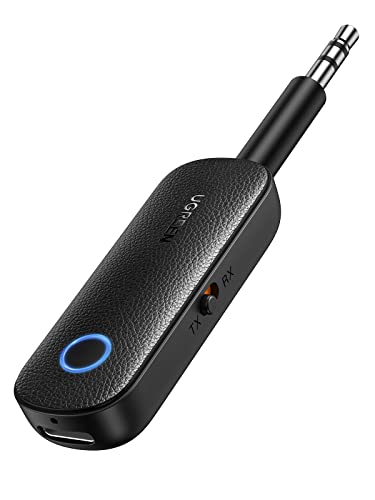
Best for a simple USB receiver: UGREEN USB Bluetooth 5.3 Audio Receiver
UGREEN sells USB Bluetooth audio receivers intended to add wireless audio reception to compatible speakers, amplifiers, or car audio systems. A USB connection may supply power, while a separate 3.5 mm or other audio cable carries sound. Confirm both connections: a USB plug does not necessarily mean the device sends digital audio over USB or works as a computer Bluetooth transmitter.
Choose it if: your sound system has the required audio input and you want a small receiver. Skip it if: you need a transmitter for headphones or a USB dongle that pairs directly with a computer as an audio source.
Quick comparison
Bluetooth version, range, and codec claims vary by product revision and region. The figures below are practical categories, not a promise that every unit or setup will achieve the same result. Check the current product specifications before purchase, especially for codecs and ports.
| Pick | Typical connection | Role | Bluetooth / codec considerations | Typical price range |
|---|---|---|---|---|
| 1Mii B06TX | Optical, coaxial, or 3.5 mm, depending on version | Transmitter | Confirm the exact version’s codecs; aptX Low Latency requires compatible headphones | About $30–$50 |
| Creative BT-W5 | USB-C | Transmitter | Bluetooth 5.3; supports SBC and several aptX formats, with compatible headphones required | About $40–$50 |
| Anker Soundsync A3352 | 3.5 mm AUX | Receiver/transmitter | Bluetooth version and codec support depend on the model specification; don’t assume low-latency aptX | About $20–$35 |
| UGREEN USB Bluetooth audio receiver | USB power plus an audio connection, depending on model | Usually receiver | Check whether Bluetooth 5.3 and your preferred codec are explicitly listed for that exact model | About $10–$25 |
How to choose: connection first, then codec and range
USB versus AUX
A USB adapter is not automatically the better option. A USB transmitter is convenient when the source supports USB audio and you want a direct digital connection. But some USB receivers use USB only for power and still need an AUX cable to carry sound. On a TV, optical output can be a useful alternative; on an older stereo or car system, a 3.5 mm input is often the simplest route.
Before buying, trace the whole path: source output → adapter input → Bluetooth link → headphones or speaker. If one connection in that chain is missing, the adapter won’t solve the problem.
Bluetooth 5.3 and real-world range
Bluetooth 5.3 is a version of the wireless standard, not a guarantee of longer range or better sound. Antenna design, transmit power, receiver quality, and obstacles all matter. Manufacturers commonly quote open-air ranges in the neighborhood of 30 to 100 feet, but walls, a cabinet, or nearby wireless equipment can reduce stable range considerably. For TV use, placing the transmitter in open air and avoiding a metal enclosure can matter more than choosing a higher version number.
Codecs and latency
Both ends of the connection need to support a codec to use it. SBC is the baseline Bluetooth audio codec; AAC is common with Apple devices, while aptX variants are available on some Android devices and accessories. aptX Low Latency can reduce delay for video, but it only helps when the transmitter and headphones both support it. aptX Adaptive may handle changing conditions, but it is not identical to a dedicated low-latency mode.
If watching dialogue-heavy TV, prioritize a matched low-latency codec or a transmitter with an explicit lip-sync feature. For music, codec compatibility and reliable connection are generally more useful than chasing the lowest possible latency.
Pairing limits and setup checklist
Most small adapters are designed for one active audio connection. Some transmitters advertise pairing with two headphones, but that can reduce codec options, change volume behavior, or add delay. “Remembering” several devices is not the same as playing to several devices at once. If two listeners are essential, confirm the manufacturer explicitly supports simultaneous dual-headphone audio.
- Check the mode: select TX (transmit) to send sound to headphones, or RX (receive) to send phone audio to wired speakers.
- Use the right output: set the TV or computer to the adapter’s connected audio output, such as optical, AUX, or USB audio.
- Pair one device first: put the adapter and headphones into pairing mode close together, then confirm audio before adding a second device.
- Verify the codec: consult both devices’ specifications or companion software; a codec printed on the adapter’s packaging does not guarantee it is active.
- Troubleshoot silence: check TV digital-audio settings, cable seating, adapter mode, and volume on both devices. Optical connections may require PCM output rather than a surround format.
Best choice by situation
| Your situation | Best starting point | What to confirm |
|---|---|---|
| TV with optical output; one listener | 1Mii B06TX | Optical input and codec match with your headphones |
| USB-C computer and compatible aptX headphones | Creative BT-W5 | USB audio compatibility and desired aptX mode |
| Phone to an AUX stereo or car system | Anker Soundsync A3352 | Receiver mode, cable, and power needs |
| Simple Bluetooth input for a wired speaker | UGREEN USB receiver | Whether USB supplies power only and which audio cable is required |
Bottom line
For a computer with USB-C, the Creative BT-W5 is the most compelling pick when its codec support matches your headphones. For a TV with conventional audio outputs, consider the 1Mii B06TX and verify the exact model’s inputs and latency features. For adding phone audio to an AUX-equipped stereo, the Anker Soundsync A3352 is the more flexible type of solution. In every case, matching ports, operating mode, and codec support is a safer buying strategy than choosing by Bluetooth version alone.